

Playing chess on the computer has revolutionised how we learn and enjoy this timeless game. Whether you're just starting your chess journey or looking to sharpen your skills against ever-improving algorithms, digital chess offers unparalleled convenience and learning opportunities. From the early days when IBM's Deep Blue defeated Garry Kasparov to today's sophisticated engines that can analyse millions of positions per second, the landscape of computer chess has transformed dramatically. But what does this mean for you as a player trying to improve?
Why Choose Computer Chess Over Traditional Board Play
Let's be honest: finding someone to play chess with at 11 PM on a Tuesday isn't always easy. This is where playing chess on the computer becomes absolutely invaluable.
Availability and Convenience
The most obvious advantage is that your opponent is always ready. No scheduling conflicts, no waiting for your friend to finish their coffee. You can play a quick game during your lunch break or settle in for a longer session when you've got time to spare.
Key benefits of digital availability:
- 24/7 access to opponents at any skill level
- No travel required to find strong competition
- Instant game start without setup time
- Pause and resume features for busy schedules
Consistent Difficulty Levels
Here's something brilliant about computer opponents: they don't have bad days. Unlike human players who might be distracted or tired, computer engines deliver consistent performance at whatever level you select. This makes them perfect for targeted practice.
When you're working on mastering chess openings, you need an opponent who'll challenge you reliably. Computer chess provides exactly that.
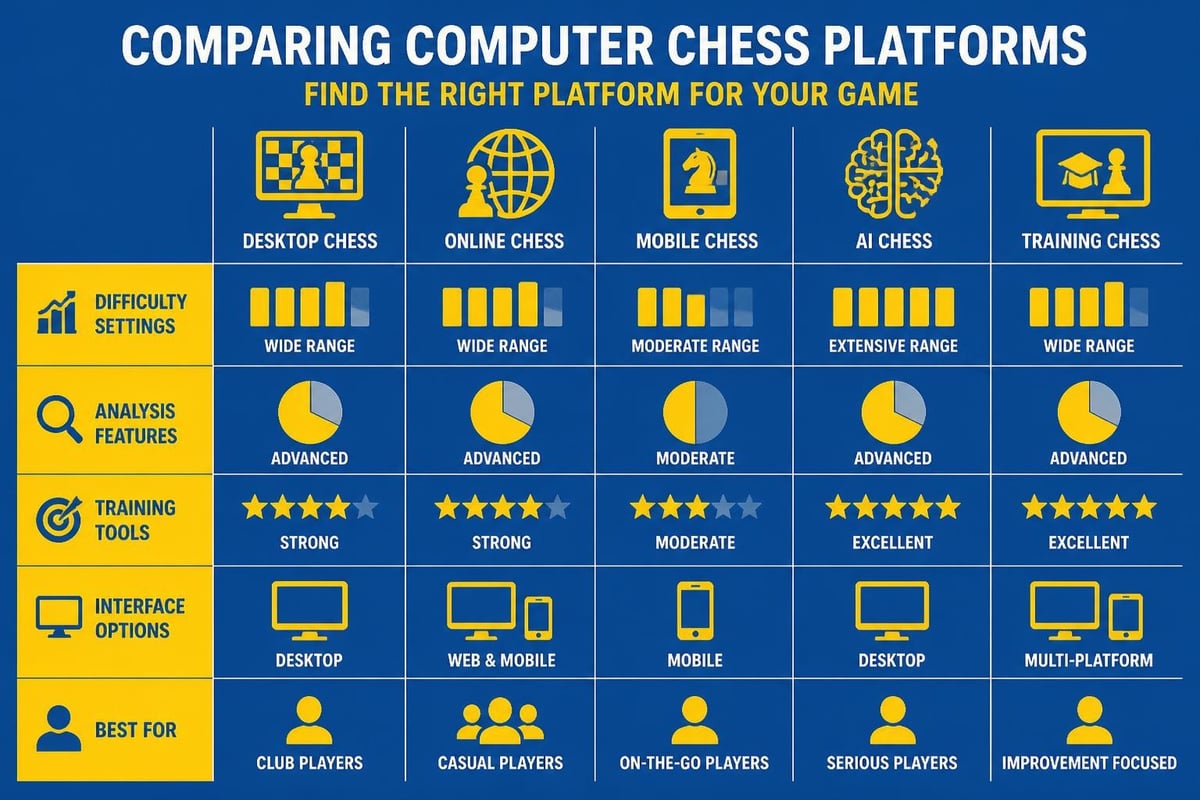
Choosing the Right Platform for Your Needs
Not all chess platforms are created equal, and finding the right one can significantly impact your improvement journey.
Free vs Premium Options
You've got choices ranging from completely free platforms to premium services with advanced features. Chess.com's computer chess platform offers a solid middle ground with both free and paid tiers.
| Platform Type | Analysis Tools | Training Features | Cost | Best For |
|---|---|---|---|---|
| Free Online | Basic | Limited puzzles | Free | Beginners |
| Premium Online | Deep analysis | Comprehensive | £5-15/month | Serious improvers |
| Desktop Software | Unlimited depth | Customisable | One-time fee | Advanced players |
| Smart Boards | Real-time feedback | Physical + digital | £150-400 | Traditional feel |
The GoChess smart chess board represents an interesting hybrid approach, combining physical pieces with digital intelligence.
Understanding Engine Strength
Modern chess engines are incredibly powerful. When you're playing chess on the computer, you're potentially facing an opponent that could challenge world champions. That's why most platforms offer adjustable difficulty settings.
Common difficulty ratings you'll encounter:
- Beginner (800-1200 ELO): Learning basic tactics
- Intermediate (1200-1800 ELO): Developing strategy
- Advanced (1800-2200 ELO): Serious competition
- Expert (2200+ ELO): Near-professional level
Understanding chess ELO ratings helps you select appropriate opponents for meaningful practice.

How Computer Chess Accelerates Your Learning
This is where things get really interesting. Playing chess on the computer isn't just about having an available opponent; it's about accessing a personal coach that never sleeps.
Instant Analysis and Feedback
Imagine finishing every game with a grandmaster reviewing each move with you. That's essentially what computer analysis provides. You can see exactly where you went wrong, what you missed, and how to improve.
After each game, you'll typically receive:
- Move-by-move accuracy ratings
- Identification of blunders and mistakes
- Better alternative moves at critical positions
- Opening accuracy and theory compliance
- Endgame evaluation and technique feedback
Pattern Recognition Through Repetition
The beauty of computer opponents is their willingness to let you replay similar positions. Struggling with a particular opening like the Catalan? You can practice it repeatedly against consistent opposition.
This repetition builds the pattern recognition that separates strong players from beginners. Your brain starts recognising tactical motifs, typical pawn structures, and strategic themes automatically.
Setting Up Effective Practice Sessions
Random games against the computer have value, but structured practice delivers faster improvement. Let me share how to maximise your digital chess sessions.
Creating a Training Routine
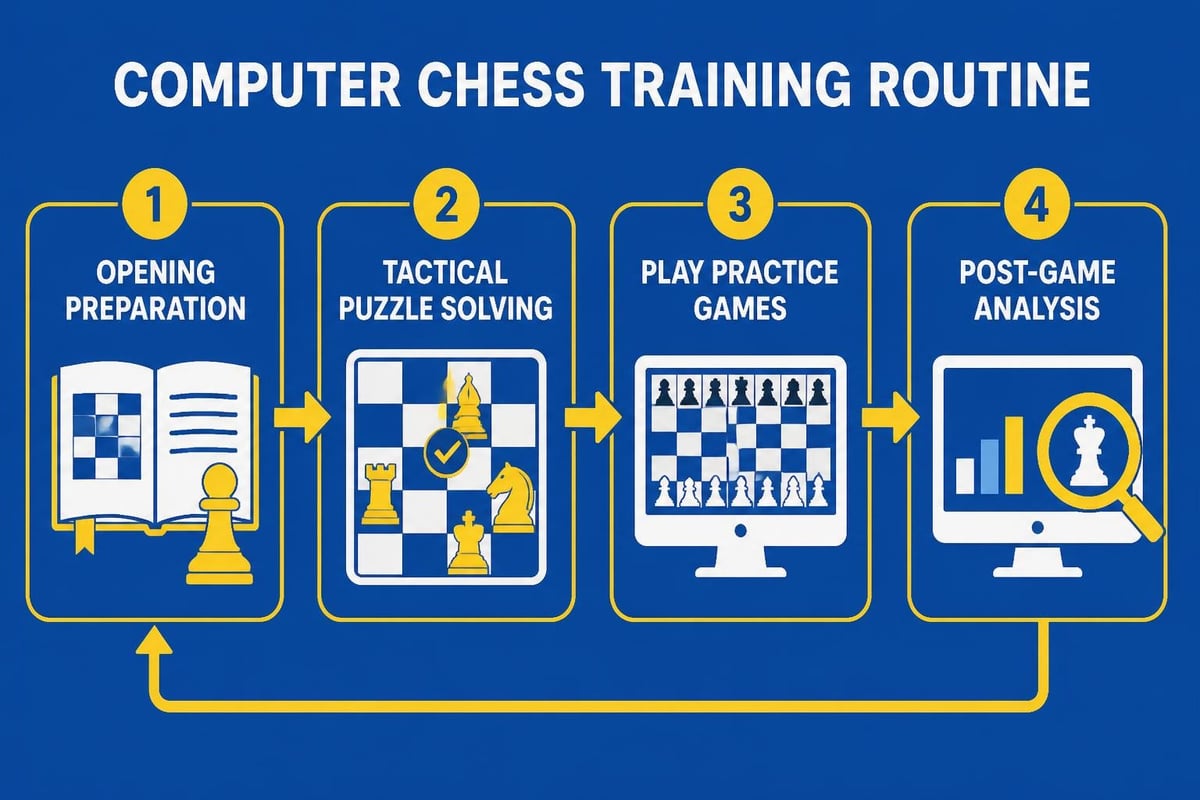
Think of playing chess on the computer as going to the gym. You wouldn't just randomly lift weights; you'd follow a programme. The same principle applies here.
Sample 60-minute training session:
- 10 minutes: Opening review and preparation
- 15 minutes: Tactical puzzles at your level
- 25 minutes: Focused game against computer
- 10 minutes: Deep analysis of critical positions
Choosing the Right Time Controls
Time management is crucial in chess. When practising on the computer, vary your time controls based on what you're working on.
| Time Control | Purpose | Skill Focus |
|---|---|---|
| Bullet (1-2 min) | Pattern recognition | Intuition, tactics |
| Blitz (3-5 min) | Quick decision-making | Opening knowledge, time pressure |
| Rapid (10-15 min) | Balanced practice | Strategy, calculation |
| Classical (30+ min) | Deep thinking | Planning, endgames |
For beginners working through Chess 101 concepts, longer time controls allow proper thinking without panic.
Advanced Features That Transform Your Game
Modern computer chess platforms offer tools that were unimaginable just a decade ago. These features can dramatically accelerate your improvement if you use them correctly.
Database Access and Opening Preparation
Many platforms provide access to millions of master games. Before playing chess on the computer, you can research specific openings and see how grandmasters handle them.
This connects perfectly with using resources like the how to play chess cheat sheet, which gives you quick reference points during your study sessions.
Engine Analysis Depth
Here's something fascinating: you can adjust how deeply the computer analyses positions. Shallow analysis is faster but less accurate; deep analysis takes longer but reveals subtle improvements.
- Depth 10-15: Quick feedback for casual review
- Depth 20-25: Serious game analysis
- Depth 30+: Critical position investigation
- Infinite analysis: Tournament preparation
Custom Position Setup
Want to practice specific endgames? Most platforms let you set up any position and play from there. This is invaluable for working through tricky situations you encountered in previous games.
Common Mistakes When Playing Against Computers
You're probably making some of these errors without realising it. Let's address them so you can get more from your digital practice.
Playing Too High Above Your Level
I see this constantly: beginners setting the computer to maximum difficulty and getting demolished. This doesn't improve your chess; it just frustrates you.
How to choose the right difficulty:
- Win roughly 40-50% of games
- Feel challenged but not hopeless
- Understand why you're losing when you do
- Gradually increase difficulty as you improve
Ignoring the Analysis
Playing without reviewing your games is like exercising without tracking progress. The analysis is where the real learning happens when you're playing chess on the computer.
Spend at least as much time reviewing as you did playing. Look for patterns in your mistakes. Are you consistently weak in certain openings? Missing tactical opportunities? Mishandling endgames?
Over-Relying on Computer Suggestions
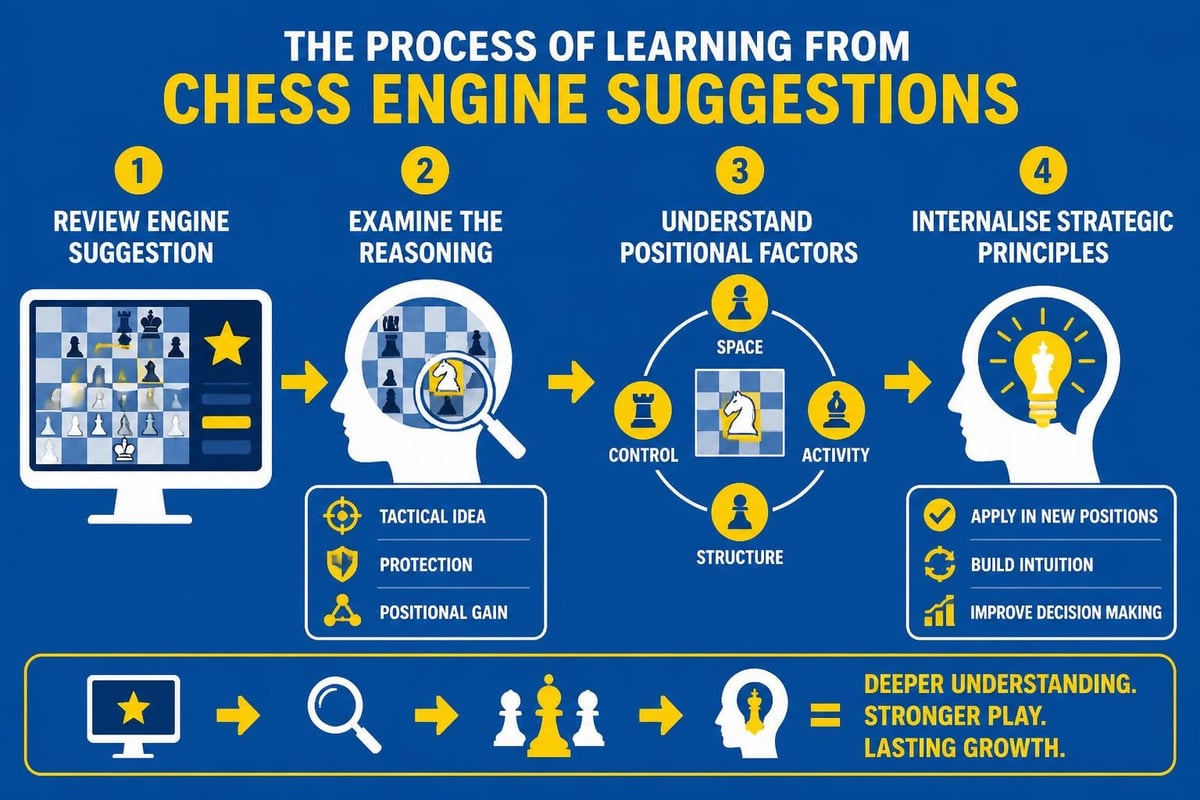
Here's a trap: using computer analysis without understanding the reasoning behind suggested moves. The computer might recommend a move, but can you explain why it's better?
The Evolution of Chess Engines and What It Means for You
The technology behind computer chess continues advancing at an astonishing pace. Understanding this evolution helps you appreciate what you're learning from.
From Brute Force to Neural Networks
Early engines like Deep Blue relied on calculating millions of positions through sheer processing power. Modern engines use sophisticated neural networks that "understand" chess more like humans do.
Research into deep learning approaches in chess has created engines that evaluate positions with almost human-like intuition combined with superhuman calculation.
What Modern Engines Can Teach You
Today's engines excel at several aspects of chess that directly improve your play:
- Positional understanding: Subtle improvements in piece placement
- Prophylactic thinking: Preventing opponent's plans
- Dynamic play: When to prioritise activity over material
- Endgame precision: Technique in simplified positions
Integrating Computer Practice with Other Study Methods
Playing chess on the computer shouldn't be your only training method. It's most effective when combined with other approaches.
Balancing Computer and Human Opponents
Computers play differently from humans. They don't bluff, don't have psychological weaknesses, and never make random mistakes. Human opponents provide different challenges:
| Opponent Type | Strengths for Training | Limitations |
|---|---|---|
| Computer | Consistent, always available, perfect tactics | Lacks human psychology, uncommon strategies |
| Human online | Realistic games, psychological elements | Variable quality, scheduling needed |
| Human over-board | Full tournament experience | Requires in-person meetings |
Combining with Opening Resources
Your computer practice becomes far more effective when supported by proper opening study. Working through opening puzzles prepares you for the positions you'll face against computer opponents.
For example, if you're exploring whether the Queen's Gambit suits your style, play it repeatedly against the computer at increasing difficulty levels while studying its theoretical foundations.
Tracking Your Progress Through Digital Play
One massive advantage of playing chess on the computer is the wealth of data you accumulate. Use it wisely.
Key Metrics to Monitor
Modern platforms track everything. Focus on metrics that actually indicate improvement:
- Rating trends: Are you climbing over months?
- Accuracy percentages: Getting closer to engine suggestions?
- Opening success rates: Which openings work best for you?
- Time management: Using your clock efficiently?
- Blunder frequency: Reducing serious mistakes?
Setting Realistic Goals
Don't expect to gain 200 rating points in a month. Sustainable improvement through playing chess on the computer takes time and consistent effort.
Realistic improvement timeline:
- Beginner to intermediate: 6-12 months of regular practice
- Intermediate to advanced: 1-2 years of focused study
- Breaking plateaus: Requires targeted work on weaknesses
Avoiding Computer Chess Burnout
Yes, you can have too much of a good thing. Here's how to keep your computer chess practice fresh and effective.
Varying Your Approach
Don't fall into the trap of playing the same time control against the same difficulty level repeatedly. Mix things up:
- Try different openings each session
- Alternate between aggressive and positional styles
- Practice specific endgames in isolation
- Challenge yourself with puzzle rushes
- Review master games in your chosen openings
Recognising When to Take Breaks
If you're losing repeatedly and getting frustrated, step away. Computer chess should challenge you, not demoralise you. Sometimes the best practice session is the one you postpone until you're mentally fresh.
The Future of Computer Chess Training
The landscape keeps evolving. What's coming next that might enhance your training?
AI-Powered Personalised Coaching
Emerging platforms use artificial intelligence to identify your specific weaknesses and create customised training programmes. Instead of generic lessons, you get exactly what you need to improve.
Virtual Reality Chess
Imagine playing chess on the computer while sitting in a virtual tournament hall, complete with atmosphere and pressure. VR chess platforms are beginning to emerge, offering immersive experiences that bridge digital and physical play.
Adaptive Difficulty Systems
Future systems might adjust difficulty in real-time based on your current performance, ensuring you're always in that sweet spot of challenging but not overwhelming.
Playing chess on the computer offers unmatched opportunities for improvement, combining the convenience of always-available opponents with powerful analytical tools that previous generations could only dream about. By choosing appropriate difficulty levels, using analysis effectively, and integrating computer practice with structured study, you'll accelerate your chess development far beyond what random games alone could achieve. Whether you're just learning the basics or pushing towards expert level, Chess Cheat Sheets provides the opening guides, puzzle collections, and endgame resources that complement your computer practice perfectly, helping you understand the positions you encounter and transform computer-aided study into genuine chess mastery.


