

Ready to take your chess skills to the next level? The digital chess world is evolving fast, and a simple chess club download can open doors to a thriving global community in 2026.
This essential handbook is designed to make your first steps easy. You’ll get clear, practical instructions for downloading, installing, and setting up the top Chess Club app.
Inside, you’ll find everything you need—from system requirements and beginner-friendly setup guides, to insider tips for maximizing features and troubleshooting common issues.
If you want to master chess in the digital age, you’re in the right place. Let’s start your journey toward smarter play and lasting improvement.

Understanding Chess Club: What It Is and Why It Matters
If you have ever wondered how to level up your chess game from the comfort of your home, the rise of digital chess clubs is your answer. A chess club download opens the door to a vibrant community, letting you play, learn, and connect with fellow enthusiasts worldwide.
At their core, Chess Club apps act as centralized platforms. They bring together features like real-time matches, tournaments, live chat, professional coaching, and in-depth analytics. Everything you need to enjoy chess and track your progress is bundled into a single, easy-to-navigate app. With a chess club download, you are always just a click away from a game, a lesson, or a new chess friend.
Let’s break down some of the most popular features you will find in leading Chess Club apps:
| Feature | Description |
|---|---|
| Real-Time Matches | Instantly play with global opponents |
| Tournaments | Join or host events, from casual to official |
| Chat & Forums | Interact, discuss strategy, and make friends |
| Coaching | Access group or private lessons from top players |
| Analytics | Review games, track stats, and pinpoint weaknesses |
Why do so many players prefer a chess club download over joining a traditional, in-person club? Here are a few reasons:
- Play anytime, anywhere, without travel or scheduling hassles.
- Meet a global community of players, from beginners to masters.
- Access learning tools and coaching 24/7, fitting your own routine.
- Enjoy a safe, moderated environment with fair play protections.
The digital chess landscape has exploded in recent years. Between 2023 and 2025, usage of online chess clubs jumped by 30 percent. Platforms like Chess.com, which recently celebrated 200 million members (Chess.com reaches 200 million members), show just how massive and inclusive this world has become. Thanks to the easy accessibility of a chess club download, players aged 13 to 45 are flocking to these platforms, whether they are new to chess or chasing grandmaster titles.
Stories abound of players who joined an online chess club, downloaded the app, and saw their ratings soar. Many users report improving their chess ratings by 200 points or more within a year, simply by taking advantage of club resources, structured lessons, and regular tournaments. The sense of community and friendly competition keeps motivation high, making your chess club download a powerful tool for personal growth.
Security and fair play are also central to the chess club download experience. Leading apps use advanced anti-cheating systems and active community moderation to create a safe, respectful space for all. You can focus on learning and having fun, knowing that the integrity of the game is protected.
Looking ahead, 2026 is a game-changer for chess club download enthusiasts. Expect smarter AI tools, personalized coaching, and hybrid events that blend online and real-world play. Innovations rolling out this year promise to make your chess journey even more engaging, interactive, and rewarding.
In short, a chess club download is so much more than just an app. It is your passport to a thriving, supportive chess community and a toolkit for lifelong improvement.

Preparing for Download: System Requirements & Compatibility
Getting ready for a chess club download is like prepping your chessboard before the first move. If you want a seamless installation, you need to know whether your device is up to the task. Let’s walk through what you’ll need before you hit that download button.
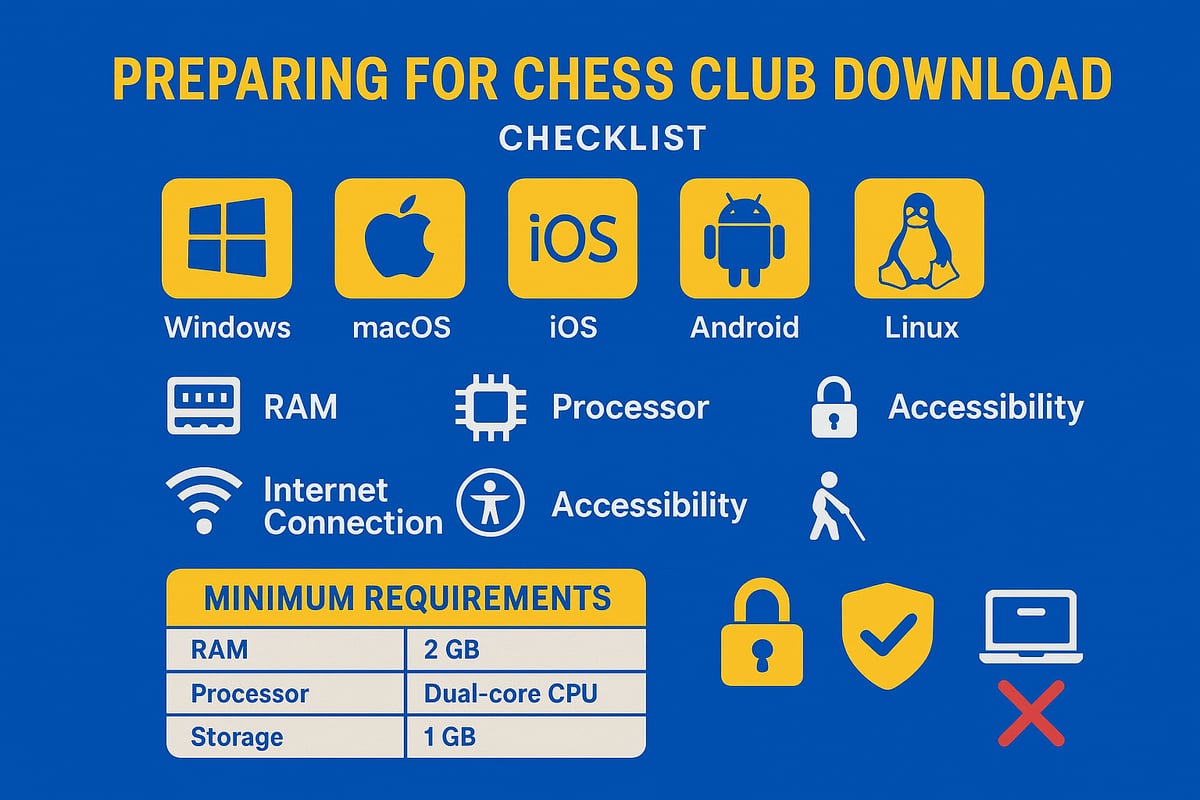
Supported Devices & Compatibility
The chess club download is available for nearly every major device. Whether you’re using Windows, macOS, iOS, Android, or even Linux, you’re covered. Check which version your device is running, as some older models might not be supported.
If you’re switching between devices, most chess club download apps allow you to sync your progress. This means you can start a game on your laptop and finish it on your phone.
Minimum Hardware & Software Requirements
Before starting your chess club download, make sure your hardware meets the minimum requirements. Most platforms recommend at least 2GB of RAM, a modern dual-core processor, and 500MB of free storage. A stable internet connection is essential—not just for downloading, but for real-time play and updates.
Here’s a quick table for reference:
| Platform | RAM | Storage | OS Version |
|---|---|---|---|
| Windows | 2GB | 500MB | Win 10 or newer |
| macOS | 2GB | 500MB | 10.13+ |
| iOS | 2GB | 500MB | iOS 13+ |
| Android | 2GB | 500MB | Android 9+ |
| Linux | 2GB | 500MB | Ubuntu 18.04+ |
Updating your operating system and clearing enough space before the chess club download helps avoid headaches later.
Accessibility & Account Setup
Modern chess club download apps come packed with accessibility features. If you use a screen reader, need colorblind mode, or prefer larger fonts, you’ll find settings to tailor your experience.
When setting up your account, you’ll need a valid email. Most platforms have age restrictions—if you’re under 18, parental controls may apply. Customizable privacy settings let you control who can see your activity and stats, keeping your chess journey as public or private as you want.
Data Privacy, Common Pitfalls & Checklist
Privacy is a top priority. Leading apps use GDPR-compliant data encryption and give you control over your information. Double-check your privacy settings during your first login.
Common pitfalls? Outdated OS, not enough storage, or spotty Wi-Fi can interrupt your chess club download. Run this checklist before you begin:
- Is your device’s OS up to date?
- Do you have at least 2GB RAM and 500MB free storage?
- Is your internet connection stable?
- Have you prepared an email for registration?
- Are accessibility features set if needed?
Double-check these steps and you’ll be ready to join the digital chess revolution. If you’re looking for ways to connect with other players once you’re set up, you can always Find Chess Coaches and Clubs to jumpstart your community experience.
Step-by-Step Chess Club Download and Installation Guide
Ready to get started with your chess club download? This guide walks you through every step, from finding the right app to launching it for your first match. Whether you are new to online chess or upgrading to the latest version, this section will ensure your journey is smooth and secure.
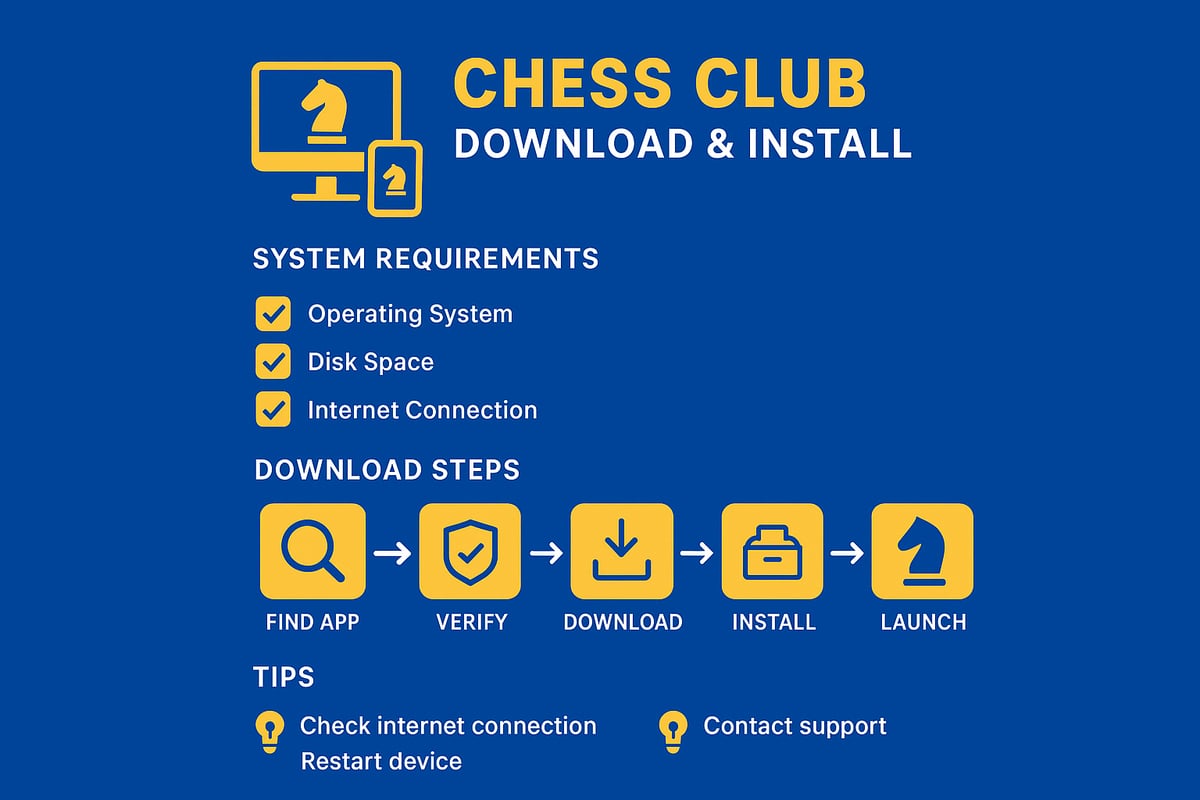
Finding the Official Chess Club App
Before you dive into your chess club download, make sure you are getting the real deal. Start by searching for the official website or verified app store listing of your preferred Chess Club platform. Popular choices include Chess.com and Lichess, both offering secure portals for all devices.
Check for the official logo, developer information, and user reviews. Authentic listings have thousands of ratings and active updates. Be wary of lookalike apps, as scams and malware can target chess fans searching for a quick chess club download.
Compare desktop and mobile versions in a quick table:
| Feature | Desktop | Mobile |
|---|---|---|
| Full Analysis | Yes | Limited |
| Notifications | Limited | Full |
| Touch Controls | No | Yes |
Reading recent user reviews helps you spot any issues before your chess club download. This early step saves you headaches down the road.
Downloading the App: Platform-Specific Instructions
Now let’s break down the chess club download by platform. For Windows and Mac, head to the official website, locate the download section, and pick the version matching your OS. Click the installer file and let the download begin.
On iOS or Android, open the App Store or Google Play. Search the app name, confirm the developer, and tap download. Always check the app size if you are on mobile data to avoid surprises.
Linux users can use package managers or direct downloads from the official site. Look for .deb, .rpm, or AppImage files suited for your distribution. If you are unsure, most sites offer help guides for a safe chess club download.
Screenshots and visual guides are often provided by top platforms, which you can reference during your chess club download. If you hit a snag, clear your cache, check your internet connection, or try restarting your device.
Remember, a secure chess club download always comes from official sources. Avoid third-party sites to protect your device and data.
Installing the Chess Club App
After your chess club download completes, it is time to install. For desktop, double-click the installer and follow prompts. You might be asked to accept permissions and the terms of service. Some installers let you pick where to save the app or customize settings.
On mobile, installation is automatic after download. If your device asks for permissions, read them carefully before agreeing. For Linux, run the appropriate command or double-click the package file.
If you encounter errors during installation, such as "file corrupted" or "unsupported OS," try re-downloading the app or updating your operating system. Here are common solutions:
- Clear old installer files before starting over
- Ensure your device meets system requirements
- Restart your device if the installer will not launch
If problems persist, contact official support for help. Most issues can be resolved quickly, especially when following the official chess club download instructions.
First Launch and Initial Setup
You have completed your chess club download and installation. Launch the app for the first time. You will often be prompted to select a language and can take a guided tour of key features.
Enable updates and patches if prompted. This keeps your chess club app running smoothly and securely. Set up notifications based on your preferences, so you never miss a match or club event.
During onboarding, you may be introduced to the basics of play, account setup, and app navigation. If you are new to online chess, check out the How to Play Chess Cheat Sheet for quick tips on rules and strategy right after your chess club download.
Take a few minutes to adjust settings like themes, sound, and accessibility options. You are now ready to connect, play, and learn with your new chess club app.
Creating and Customizing Your Chess Club Account
Getting started with your chess club download is more than just installing an app. It’s about building your own space within the global chess community. Once you’ve completed your chess club download, you’ll want to set up and personalize your account so you can make the most of every game, lesson, and conversation.
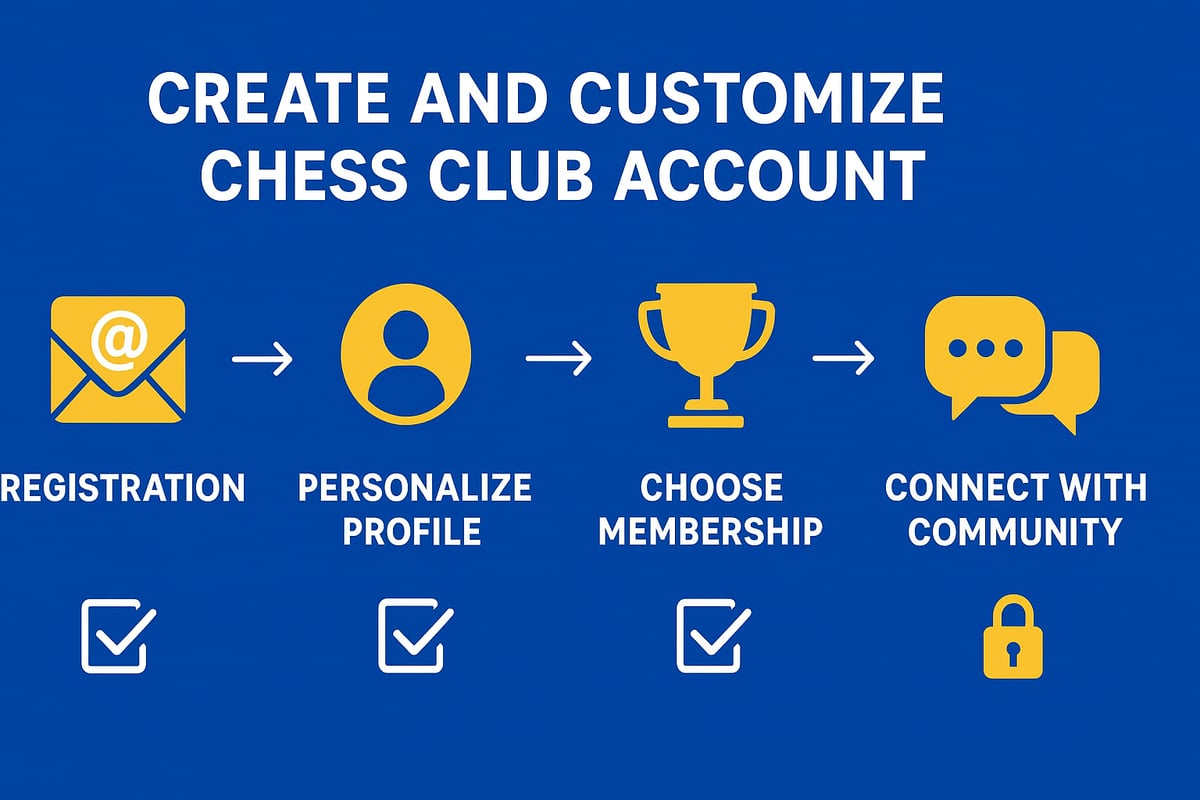
Account Registration Process
After your chess club download, the first step is account registration. This process is straightforward, whether you’re using Windows, macOS, Android, or iOS.
To register, open the app and select the “Sign Up” option. You’ll be prompted to:
- Enter your email address.
- Create a strong password (use a mix of letters, numbers, and symbols).
- Choose a unique username and upload an avatar.
- Confirm your age for compliance, and set up parental controls if under 18.
Tip: Use a secure password manager to store your credentials safely.
Once you submit your details, verify your email address by clicking the link sent to your inbox. This ensures your chess club download is linked to a valid, secure account.
Personalizing Your Profile
Customizing your profile after your chess club download not only helps you stand out but also enhances your experience. Start by adding a profile photo and writing a short bio about your chess journey or favorite openings.
Next, set your skill level so the app can match you with suitable opponents. You can also list your favorite openings or chess styles for a more tailored experience.
Privacy settings are essential. Decide who can view your profile, stats, and games. Many chess club downloads allow you to link social accounts or even add your chess federation ID for official recognition.
Here’s a quick personalization checklist:
- Profile photo
- Short bio
- Skill level
- Favorite openings
- Privacy preferences
Exploring Membership Tiers and Benefits
After your chess club download, you’ll notice most platforms offer both free and premium memberships. Free accounts give you access to basic play, tournaments, and community features. Premium tiers unlock advanced game analysis, exclusive tournaments, and coaching resources.
Payment options vary, with monthly, yearly, or even trial periods available. Interestingly, about 60% of users start with the free tier, but nearly 30% upgrade to premium within three months as they explore advanced features.
For those pursuing official titles, platforms like FIDE Online Arena offer recognized ratings, blending your chess club download with the broader chess world.
Connecting With the Community
One of the best parts of your chess club download is joining a vibrant, global community. You can connect with friends, join clubs or teams, and participate in group chats and forums.
Follow top players, join local or international groups, and take part in club tournaments. The rise of club-based events in 2025 shows how engaging and dynamic these communities have become.
Whether you’re a beginner or a seasoned player, connecting with others after your chess club download will motivate you, provide support, and unlock new opportunities to learn and compete.
Navigating Core Features: Play, Learn, and Engage
Joining a digital chess club means stepping into a world of features designed to make your chess journey richer and more interactive than ever. After your chess club download, you’ll find a platform brimming with ways to play, learn, and connect. Let’s walk through the core features that will shape your experience and help you make the most of every session.
Playing Games and Tournaments
Once your chess club download is complete, the first thing you’ll notice is how easy it is to jump into a game. Whether you prefer blitz, rapid, or classical formats, matchmaking is streamlined and fast. You can play with friends or get paired with someone new from across the globe in seconds.
Here’s a quick comparison of popular game formats you’ll find after your chess club download:
| Format | Time Control | Popularity Level |
|---|---|---|
| Blitz | 3-5 min | High |
| Rapid | 10-15 min | Medium |
| Classical | 30+ min | Niche |
Love organizing events? Hosting and joining tournaments is a breeze. You can set up private club events, invite members, and even customize rules for your group. Many users share stories of hosting themed tournaments, like “Night Owl Blitz” or “Beginner’s Ladder.”
Need to keep things fair? Don’t worry. Anti-cheating systems and moderators help maintain a level playing field, making every match enjoyable.
Learning Tools and Resources
If you’re aiming to improve, the learning section is where your chess club download really shines. Interactive lessons, AI-powered analysis, and a rich library of video tutorials are just a click away. You’ll find tools that dissect your games, highlight your strengths, and suggest what to study next.
Puzzles are a fan favorite. Want to sharpen your tactical vision? Try modes like puzzle rush or daily challenge. In fact, players who regularly use puzzles see measurable improvement. For a deeper dive into puzzle practice, check out the Improve with Chess Puzzles collection—these resources pair perfectly with your club’s built-in features.
Track your progress with detailed stats and personalized improvement plans. Many users report rating jumps of 100 points or more after focusing on structured lessons and puzzles. The best part? You can set your own pace and revisit any lesson as often as you like.
Social and Community Features
A chess club download doesn’t just connect you to games—it connects you to people. Real-time chat lets you discuss strategy or just say hello after a tough match. Forums and discussion groups are buzzing with activity, from opening theory debates to meme sharing.
Leaderboards and achievement badges add a layer of friendly competition. Who doesn’t love seeing their name climb the rankings or unlocking a new badge after a marathon puzzle session? Safety is a priority, too: robust reporting and blocking features help create a welcoming space for everyone.
Club-based tournaments and themed challenges are growing fast. In 2025, participation in these events doubled, showing just how vibrant and active these communities have become. Have a question or need advice? There’s always someone ready to chat or lend a hand.
Integrations and Cross-Platform Sync
Your chess club download is designed for flexibility. Progress syncs seamlessly across devices, so you can start a game on your laptop and finish on your phone. Want to analyze games in depth? You can connect to external chess engines or databases for advanced study.
Exporting your games is simple. Share them with a coach, post them in forums, or keep a digital archive for future review. Integrations with popular study tools, like ChessBase or Lichess Studies, mean you don’t have to start from scratch elsewhere.
Customizing your experience is easy, too. Adjust board themes, piece sets, and notification preferences to suit your style. With everything working together, your chess club download becomes the central hub for all your chess activity.
Troubleshooting and Advanced Tips for Chess Club Users
Every chess club download experience is unique, and even the most seamless apps can bring the occasional hiccup. You might breeze through setup, or you might hit a snag. Let’s walk through solutions for common issues, optimize your journey, and unlock advanced features so you get the most from your chess club download.
Common Download and Installation Issues
Running into trouble with your chess club download? You’re not alone, and most problems are easy to fix with a little know-how.
Typical Problems and Quick Fixes:
| Problem | Solution |
|---|---|
| Download won’t start | Check your internet connection, clear cache |
| File is corrupted | Delete and retry the chess club download |
| Device not supported | Update your OS or check device requirements |
| App won’t install | Free up storage, restart device, try again |
If your chess club download keeps failing, double-check that your device meets the minimum specs. Make sure you’re downloading from the official app store or website, as unofficial sources can cause issues or even risk your security.
Still stuck? Many apps include built-in help or FAQ sections for troubleshooting. If all else fails, reach out to customer support with details about your device, operating system, and error messages. Most users find that with a bit of persistence, their chess club download succeeds on the second try.
Account and Security Problems
Protecting your account is crucial. If you forget your password, most chess club download platforms offer a password reset via email. Follow the prompts, and use a strong, unique password for best results.
For extra protection, enable two-factor authentication. This adds a second layer of security, making it much harder for anyone else to access your account. Always be on the lookout for phishing emails pretending to be from your chess club download provider. Never share your login details.
If you’re ever locked out, check your email for notifications or contact support. Most issues are resolved quickly with the right information.
Optimizing Performance and User Experience
A smooth chess club download experience is only the beginning. Once you’re set up, you’ll want the app to run as smoothly as possible.
Reduce lag by connecting to a stable Wi-Fi network instead of mobile data. If you notice delays or freezing, lower graphics settings in the app preferences. Close unused apps on your device to free up resources.
Customize your notifications so you only get alerts about games or events that matter to you. Accessibility settings like screen readers, colorblind modes, and adjustable fonts can make your chess club download easier to use for everyone.
If you ever feel overwhelmed by alerts or visuals, tweak these settings until the app feels just right.
Advanced Usage: Custom Settings and Add-Ons
Ready to take your chess club download to the next level? Explore plugins and add-ons that enhance game analysis or add new board themes and piece sets. Many users love trying out custom designs to personalize their experience.
For deeper study, consider integrating puzzle practice or study tools. The guide on Positional Skills with Chess Puzzles is a fantastic resource for sharpening your skills directly within your chess club download platform.
Popular user-created enhancements can include unique sound packs, advanced move analysis, and even integration with external chess engines. These extras turn your chess club download into a powerful learning environment.
Staying Updated: Patches, New Features, and Community News
Keeping your chess club download updated is essential for security and performance. Enable auto-updates in your device settings so you never miss the latest features or bug fixes.
Stay connected by following official news channels, forums, or email newsletters. Many clubs announce new tournaments, features, or community events in these spaces.
If you’re interested in testing upcoming releases, look for beta programs within your chess club download app. User feedback often shapes the direction of future updates, so your voice counts.
Maximizing Your Chess Club Experience: Strategies for Growth
Jumping into your chess club download is just the beginning. Want to truly level up your skills and make the most of your new app? Let’s talk about how you can set goals, tap into the chess community, balance your playing and learning, and explore resources that push you even further. Ready to become your best chess self? Let’s dive in.
Setting Goals and Tracking Progress
After your chess club download, setting clear goals is your launchpad for improvement. Ask yourself, what do you want to achieve? Is it boosting your rating, mastering a new opening, or simply playing more consistently each week?
Most chess club apps include built-in trackers and analytics. These tools help you monitor your progress, break down your strengths and weaknesses, and celebrate milestones. For example, you might see your win rate climb after sticking to a study routine or notice patterns in your losses that you can address.
Here’s a simple table to help you visualize common goal types and how to track them:
| Goal Type | How to Track | Recommended Tool |
|---|---|---|
| Rating Increase | Weekly/Monthly | In-app Analytics |
| Opening Mastery | Game Review | Opening Explorer |
| Consistency | Games Played/Week | Progress Tracker |
Users who set weekly or monthly goals inside their chess club download see improvement rates up to 25% faster. Remember, small, steady progress leads to big results.
Leveraging Community and Coaching
The heart of any chess club download is its community. You’re not just playing solo, you’re joining a global network of chess fans, coaches, and friends. So, how do you make the most of this?
Start by joining clubs, teams, or local groups within the app. Participate in forums, chats, and club tournaments. This is where you can find mentors, get feedback, and even make friends who share your passion. Many platforms offer group coaching or workshops, which can be a game-changer for your growth.
Did you know chess is expanding into the esports world, attracting even wider audiences? According to Chess looking for new audiences with Esports World Cup looming, chess clubs are innovating to connect more players than ever. So, after your chess club download, get involved and see how far your network can take you.
Balancing Play and Study for Improvement
Getting the best results from your chess club download means finding a healthy rhythm between playing games and studying. It’s easy to get caught up in one or the other, but balance is the secret sauce.
Try scheduling time for both. For example, play a few games, then spend 10-15 minutes reviewing your moves or solving puzzles. Use built-in lessons and analysis tools to identify areas for improvement. Top players often recommend alternating between active play and focused study, which keeps learning fresh and prevents burnout.
Here are a few tips:
- Schedule games and lessons in advance.
- Use puzzle rush or tactics trainers between matches.
- Review your games with AI analysis after each session.
Remember, improvement is a journey, not a sprint. Your chess club download gives you the tools, but it’s your balanced approach that brings real progress.
Exploring External Resources for Chess Mastery
While your chess club download offers plenty, pairing it with external resources can take your skills to the next level. Think of books, video courses, streams from top players, or integrating with tools like ChessBase or Lichess Studies.
Many advanced players use these resources alongside their club app to deepen their understanding and accelerate learning. The chess world is booming, with the Global Chess Market Size to Reach $3.3 Billion by 2030, showing just how many new tools and learning opportunities are out there.
Try combining club play with outside study. Watch a grandmaster stream, read a strategy book, or analyze games in a third-party tool. This well-rounded approach, centered on your chess club download, will help you reach your full potential.
So, now that you’ve got the inside scoop on downloading and setting up your Chess Club app, are you wondering what’s next? If you really want to level up quickly without spending hours memorizing complicated lines, why not give your openings a serious boost? I always tell friends that the right resources make all the difference—and that’s exactly what you’ll find here. Ready to make every move count and play with confidence from the very first game? Start Improving Your Openings and see how much easier progress can be when you’ve got the perfect guide at your fingertips.


